AI-Powered Underwriting Workbench for commercial and specialty lines
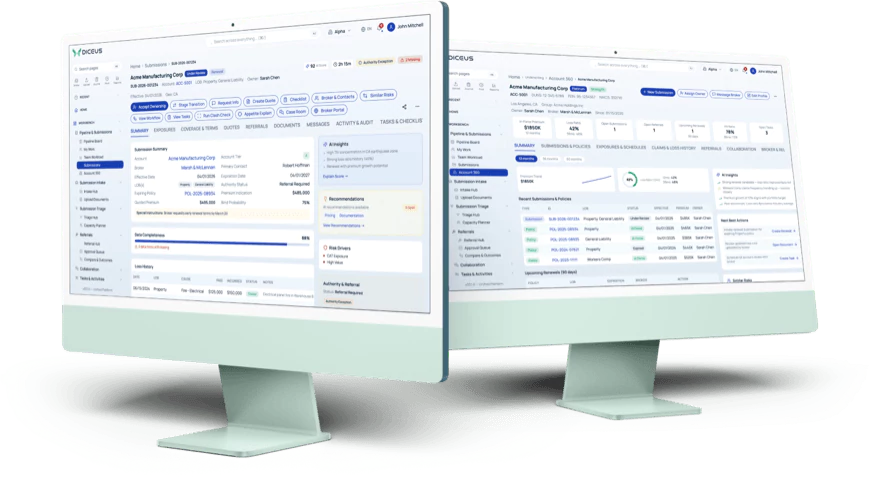
An underwriting workbench is where a commercial underwriter works: submissions, risk scoring, pricing, referrals, and broker activity in one place, above the core system rather than replacing it. DICEUS AI‑Powered Underwriting Workbench is built for MGAs and carriers writing commercial and specialty risks.
Book a demoWorkbench or policy administration system?
The underwriting workbench and the policy administration system are different products, and buyers are often unsure which one they need. The workbench is where underwriters make the decision: intake, scoring, appetite, pricing, referrals, and authority, all before issuing a policy.
The policy administration system takes over once the risk is bound, and handles issuance, endorsements, billing, and the policy record. DICEUS offers both, so the honest answer is that they work together – your policy system stays where it is, and the workbench connects to it through open APIs.
Who benefits from our insurance underwriting platform?
- Commercial insurers that need to automate underwriting
- Mutual insurers who need more intelligent workflows
- Managing General Agents (MGAs) streamlining broker engagement and quoting
- Underwriters who want to automate risk selection
- Distribution leaders managing broker collaborations
- Carriers in Property, General Liability, Workers’ Comp, Cyber, and Cargo
An underwriting workbench for MGAs and carriers
Underwriting teams do not lack software. What they usually lack is one place to monitor submissions, pricing, referrals, and broker activity. A submission arrives by email with attachments; the workbench reads them, scores the risk, and puts it in a prioritized queue.
Quotes, referrals, and authority limits stay on the same record, so a senior underwriter never has to ask for the file twice. If you are comparing underwriting software, look at what happens before the quote – intake, clash checks, and appetite scoring take time long before pricing starts.
Pain points the platform solves
According to Accenture, underwriting specialists spend 40% of their time on non‑core tasks, losing $85–160 billion over the next few years.
- 01
Inaccurate appetite scoring and pricing
Risk is judged case by case, so the same account prices differently twice.
- 02
Time lost to administrative work
Manual document handling and data entry, before any underwriting judgment starts.
- 03
Opportunities lost to slow quotes
Brokers place the risk elsewhere while the submission is still being read.
A ready‑made underwriting system with AI support helps you build and automate workflows, improve decisions, and select risk more consistently.
AI‑powered Underwriting Workbench — Discover our transformative solution for underwriting
Book a demoWhat can underwriters do on the platform?
Get and monitor submissions

Underwriters have a helicopter view of all incoming submissions – account and policy details, premiums, and statuses – collected automatically from emails or other channels.
Use AI to handle intake and assess risks

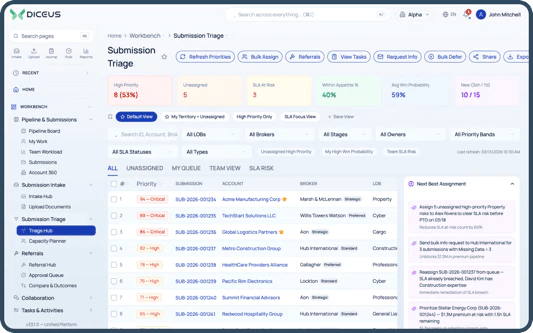
Underwriters do not work with unstructured documents. AI handles submissions, assesses appetite, assigns triage and winnability scores, and gives data‑driven recommendations.
Make data-driven decisions

AI analyzes information to detect anomalies, shows risk indicators, and provides real‑time insights, which improves both the quality and the speed of underwriting.
Automate quoting

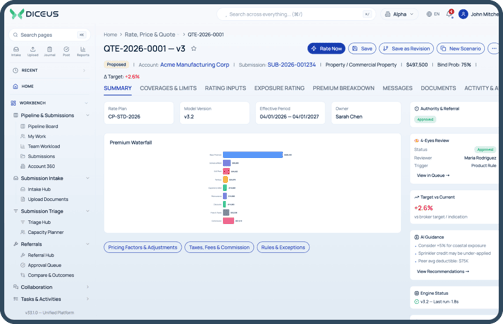
Rather than calculating quotes by hand, underwriters use AI for pricing and produce more accurate quotes, reducing workload and turnaround time.
Find coverage conflicts

Built‑in clash check and risk overlap detection raise alerts on policy conflicts, coverage duplications, and accumulations before they reach the book.
Escalate complex cases with referrals

Underwriters refer complicated submissions to more senior colleagues with all the detail needed for an informed review attached.
Manage underwriting authority

Authority levels and special conditions are managed from a dashboard, so underwriters handle what their authority covers without asking.
Focus with personalized dashboards

Each underwriter gets a real‑time overview of tasks, account statuses, and performance against goals, which is what makes prioritizing possible.
Check account history

Submissions, communication records, and performance metrics are in one place, so each account decision is made with a visible history.
Collaborate with brokers

Broker profiles, submission history, KPIs, and authority levels are visible, so collaboration and broker performance are monitored in the same system.
Create rules and set goals

Custom rules process standard cases automatically, and underwriters set and monitor goals against underwriting targets.
How a submission moves through the workbench
-
01
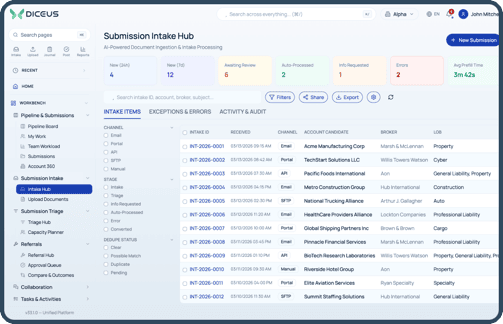
IntakeThe submission arrives by email with attachments. The workbench extracts the data and creates the record, without anyone re‑keying it.
-
02
Clearance and triageDuplicates and prior submissions are matched, and the submission enters the queue with a triage score against the rest of the day’s work.
-
03
Appetite and risk assessmentThe AI Advisor scores appetite and win probability, flags anomalies, and surfaces similar risks already on the book.
-
04
Clash checkOverlapping coverage and accumulation against the existing portfolio are detected before pricing starts, not after the quote has gone out.
-
05
Price and quotePricing rules and models produce the quote, which the underwriter reviews, adjusts where judgment is needed, and sends.
-
06
ReferralWhere authority requires it, the case goes to a senior underwriter with the full file attached, and comes back in the same system.
-
07
Bind or declineThe outcome is recorded against the account and the dashboards update, so the portfolio view is current rather than reconstructed.
Top 3 use cases
Use case 1 – Sorting, evaluating, and prioritizing incoming applications
Challenge
Underwriters get dozens of submissions through email daily, each with attachments in various formats. Reviewing them by hand to see what fits appetite takes most of the morning.
Solution the workbench provides:
- The system extracts key information from emails and documents using natural language processing
- AI assigns a risk appetite score, triage level, and winnability rating
- Underwriters get a prioritized list and know which application to progress, postpone, or reject
Result
Low‑fit risks are filtered out by the system, and underwriters spend their time on high‑potential opportunities instead of triage.
Use case 2 – Improving quote accuracy
Challenge
Quoting commercial risks means balancing several pricing models, business rules, and manual data entry, which causes errors and delays.
Solution the workbench provides:
- Pre‑specified pricing rules and models, assisted by AI, create quotes from application data
- Built‑in business rules and clash checks flag conflicting coverage before quoting
- Underwriters review, prepare, and send quotes within minutes
Result
Quotes go out faster and with fewer manual errors.
Use case 3 – Managing portfolio risk and referrals
Challenge
Underwriters handling a portfolio struggle to see overlapping risks across accounts, and have no clean way to escalate borderline cases.
Solution the workbench provides:
- Clash detection notifies underwriters of accumulation risk in a specific area
- Referrals carry complete account details and supporting documents through the system
- Authority dashboards enforce the referral rules, and the senior underwriter replies in the same system
Result
Risk overlap is caught before binding, and the referral leaves a trail instead of sitting in an inbox.
Key value propositions
 AI-driven intelligent decision support
Embedded AI analyzes unstructured data, evaluates risk, finds anomalies, and shows decision‑ready insights in real time, with recommendations that improve risk selection and pricing accuracy.
 Workflow management
Handle every step of the underwriting journey from a single pane of glass, with configurable workflows and full visibility into submissions, quotes, policies, and tasks.
 Rate, price, and quote automation
AI‑assisted pricing models and pre‑configured business rules speed up quoting, cutting manual work and inconsistency while improving turnaround.
 AI-powered submission intake
Ingest unstructured submissions from email and documents using natural language processing, turning messy attachments into structured, actionable data.
 Clause and wording library
Standardize policy language and maintain contract certainty with an intelligent clause library, which also speeds up document generation.
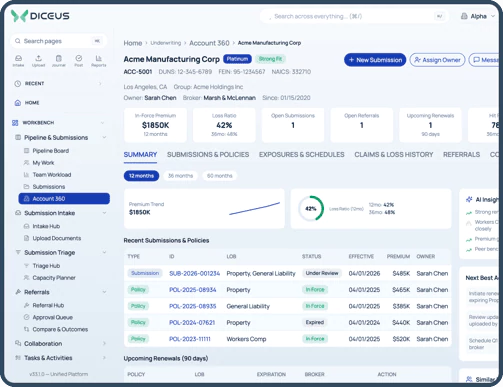
 360° customer view
Full policy history, claims data, broker relationships, and current exposure on one account, so strategic decisions are made with the complete picture.
 Delegated authority
Authority limits, referral triggers, and access by partner role are managed in the workbench. Broker and coverholder self‑service runs on the DICEUS Broker Portal, a separate product the workbench connects to.
 Clash check and risk overlap detection
Detect policy overlaps, conflicting coverages, and accumulations in real time, which is what keeps the book inside the exposure you intended.
 External integrations
Connect to risk data providers, bordereaux processors, and asset valuation sources through open APIs, without disrupting the workflows you already run.
 Explainable recommendations
Every score the AI Advisor produces can be opened: the drivers behind it, the data it used, and the rule hits that applied, and that reasoning stays on the record.
Want to learn more? Our team will showcase all the functionalities for you
Book a demoOur Underwriting Workbench offers an AI Advisor
AI Advisor is an AI‑powered scoring engine, built as a microservice and integrated by REST API, that gives underwriters a score made of three components: triage, appetite, and win probability. To train models that fit your book, we need 3,000–5,000 historical data entries from your company.
-
Step 1
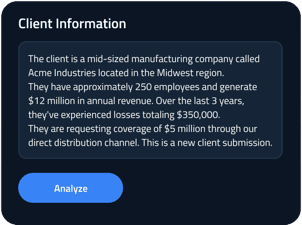
Enter your client’s information and wait a few seconds
-
Step 2
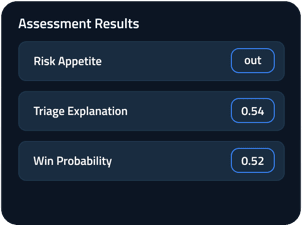
Get assessment results and AI recommendations
-
Step 3
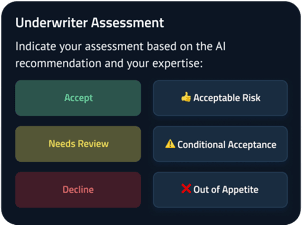
Complete your assessment
Is AI replacing underwriters? No, and the workbench is not built on that premise. AI in underwriting reads submissions, scores them, and ranks the queue; the underwriter decides. Every recommendation is attached to a case a person owns, with the reasoning visible and the authority rules unchanged. What changes is where the underwriter’s day goes: less re‑keying and sorting, more time on the risks worth pricing carefully.
Components of our Underwriting Workbench
-
01Dashboard (submissions and KPIs)
Central view for underwriters with a submission table, KPI widgets, and quick actions.
-
02Workflow and SLA engine
Configurable underwriting workflows, stage routing, and SLA enforcement.
-
03Risk assessment and AI
Scoring engine, fraud detection, and AI‑driven recommendations.
-
04Auto decisioning
Rule‑based automation for accepting or rejecting low‑risk applications.
-
05Reports and analytics
Operational dashboards, KPIs, and performance insights.
-
06External integrations
Connections with third‑party data providers, rating engines, and core insurance systems.
-
07Notifications and reminders
Email and in‑app alerts, SLA reminders, and workflow‑based triggers.
-
08Rate, price, and quote (RPQ)
Premium calculation, pricing scenarios, and quote generation.
-
09Business lines and umbrella support
Multiple commercial lines – Property, Liability, Cargo, and others – and umbrella policy linking.
-
10Relationships with brokers
Management of brokers, MGAs, and distribution partners, including profiles and commissions.
-
11Underwriter goals and business rules
Set and track underwriter KPIs, targets, and business rules.
-
12Capturing unstructured submissions
Auto‑extraction from email attachments in PDF, Word, and other formats.
-
13Clash check and risk overlap detection
Identify duplicated or overlapping risks across the book of business.
-
14Bordereaux processing
Ingest and map structured and semi‑structured bordereaux files into the system.
Lines of business
The workbench is built for commercial and specialty risks. The lines it runs today are Property, General Liability, Workers’ Comp, Cyber, and Cargo, each with its own rules and scoring models, and umbrella policies link to the underlying cover. Health and life underwriting are separate DICEUS products.
Benefits of our Underwriting Workbench
-

Optimized data
Siloed, unstructured data becomes organized information, which is what makes a single customer view and data‑driven decisions possible.
-

Automated risk selection
AI assesses risk, customer history, and clashes accurately, so quotes go out and customers are enrolled while the opportunity is still open.
-

Underwriting journeys
Build the workflows your team actually uses, configuring and predefining rules where the process needs them.
-

Effective collaboration
A portal and tools for working with brokers, MGAs, and other partners, with each one seeing what their role allows.
Why choose our Underwriting Workbench?
- Powered by AI, with intelligent decision support
- Helps underwriters focus on core activities
- User‑friendly dashboards and report generation
- Ready‑made software, no system to build from scratch
- Quick to implement
Deployment and security
 Deployment model
The workbench runs on‑premises, in the cloud, or in a hybrid model. We agree on the model during scoping, based on your infrastructure, data residency, and IT requirements. Whichever you choose, the functionality and the configuration options are the same.
 Access and audit
Access is role‑based and follows your underwriting authority structure, so people see and approve only what their role allows. Every submission, score, referral, and decision is recorded with who acted and when, which makes an AI‑assisted decision defensible after the fact. Security and compliance controls are agreed with your IT and security teams during implementation.
How the workbench compares
Most teams run underwriting one of three ways: spreadsheets and shared inboxes, a core system module, or something built in‑house.
DICEUS has built insurance technology since 2011 and has licensed its own insurance products since 2024, for commercial, specialty, and alternative risk operations.
It has worked with insurers and brokers including The Baldwin Group, Fairfax Group, WTW, UNIQA, and Vienna Insurance Group, alongside industry partners VCIA, Fadata, Insurtech UK, Swiss Insurtech Hub, InsureMO, and Claim Technology, and technology partners Microsoft, Google Cloud, and Oracle.
FAQ
What is an underwriting workbench?
A digital workspace built around the underwriting decision. It supports underwriters with AI‑assisted scoring, automated workflows, and collaboration in one place, rather than spreading submissions, quotes, and referrals across several systems.
What is the difference between a workbench and underwriting software in general?
Underwriting software is a broad term covering rating engines, policy systems, and data tools. A workbench is the underwriter’s workspace, where submissions, scoring, quotes, referrals, and broker activity sit together.
Do we have to replace our policy administration system?
No. The workbench connects to core systems, data providers, and bordereaux processors through open APIs. Your policy system stays where it is and keeps doing what it does after the risk is bound.
How do you implement the workbench?
We map your underwriting journeys and data flows first, then configure workflows and connect the systems you are keeping. Implementation runs from four weeks to nine months depending on scope, agreed upfront.
How much data do you need to train the AI Advisor?
Between 3,000 and 5,000 historical entries from your company. The score it produces covers triage, appetite, and win probability, tuned to your book rather than to an industry average.
What types of submissions can it process?
Structured and unstructured, from email, PDFs, spreadsheets, and digital forms. The required data is extracted automatically and structured for review, so an underwriter opens a record rather than an attachment.
Does it work for all lines of business?
It works for Property, General Liability, Workers’ Comp, Cyber, and Cargo, each with its own rules and scoring models, and umbrella policies link to the underlying cover. Health and life underwriting are separate DICEUS products.
Can underwriters adjust their rules and workflows?
Yes. Underwriters and admins create and manage business rules, risk thresholds, referral triggers, and decision criteria, so the system follows your underwriting guidelines rather than a vendor’s defaults.
Do brokers and coverholders get a portal?
Broker and coverholder self‑service is the DICEUS Broker Portal, a separate product. The workbench connects to it, so submissions arrive structured and authority limits are applied. It also takes submissions by email and API without the portal.
Is the workbench only for carriers?
No. MGAs get broker submissions, quoting, and delegated authority tools; carriers get portfolio control, clash checks, and referrals. The same system serves both, configured differently.
We already collect submissions through a broker portal. Is that enough?
A portal collects submissions. The workbench also reads them, scores them against your appetite, and routes them through your workflow, which is the part that takes underwriter time.


